
You sit down to study, open your laptop or notebook, and your hand automatically reaches for your phone.
You just want to check one notification—but five reels, three chats, and 30 minutes later, your focus window is gone.
If you are a student, knowledge worker, or self-learner in your 20s–40s, this probably happens more often than you’d like to admit.
You are not lazy; you are trying to focus in an environment designed to pull your attention away every few seconds.
This 15-minute offline study routine is built for those moments.
Instead of forcing yourself to “have more willpower,” you change the environment so that, for one short block, your brain does not have to fight your phone.
Recent studies on smartphone notifications show that even a single pop-up can derail mental focus for several seconds and increase error rates on cognitive tasks.
Short, distraction-free blocks let your brain sink into the task without constantly climbing back from those micro-distractions.
I started using this 15-minute offline block on days when my brain felt scattered, and it was just enough structure to finish one small but important task instead of doom-scrolling.
Why Short Offline Blocks Work
Many cognitive and learning researchers note that deep focus tends to drop after about 20–30 minutes for most people.
Long cram sessions sound productive, but they are hard to sustain in a world of notifications, chats, and emails.
On the other hand, self-regulated learning research consistently finds that students who use simple, repeatable routines—planning, starting at a set time, and reviewing what they did—tend to achieve better results than those who study in random, irregular bursts.
A 15-minute offline study routine combines both ideas:
- It is short enough that your brain believes “I can do this.”
- It is structured enough that, repeated daily, it becomes an automatic cue for focus.
In this guide, you will build a three-step routine:
- Prep (3 minutes): clear your space, set a tiny goal, and set a timer
- Focus (10 minutes): offline work on one task only
- Review (2 minutes): log what you did and plan the next mini-block
Step 1 – Prep Your Space and Turn the Internet Down (3 Minutes)
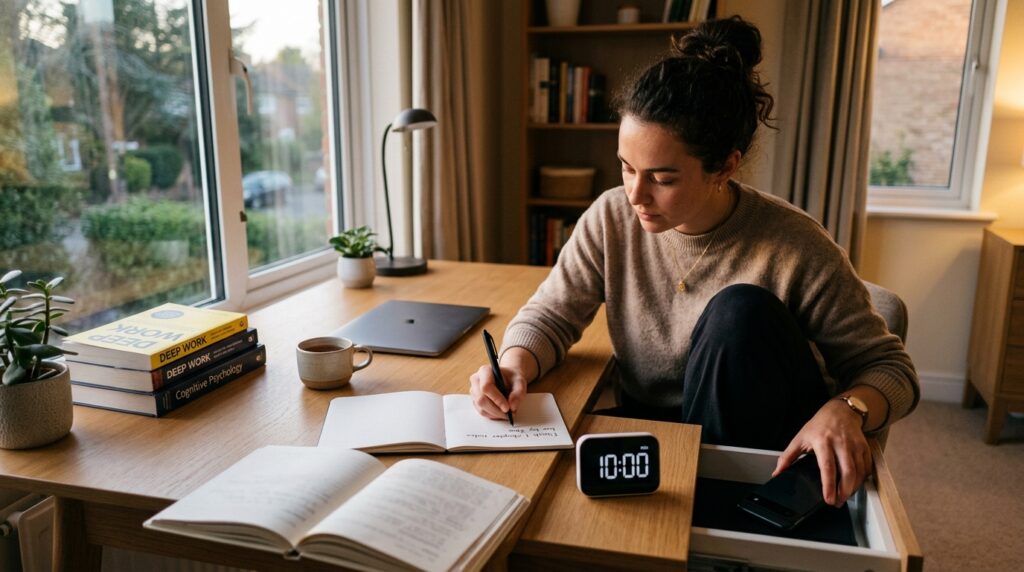
1. Physically hide your phone
For this block, the phone is the main enemy.
Put it in another room, your bag, or a closed drawer—anywhere you cannot reach it without standing up.
If you absolutely must keep it nearby for emergencies, switch it to silent or focus mode and place it face down, out of your direct line of sight.
Research suggests notifications, even when you do not respond to them, can still impair attention and slow down task performance.
2. Simplify your desk
Look at your desk and remove everything you do not need for this specific 15-minute block.
For most tasks, that means:
- One book or printout
- One notebook or pad
- One pen or highlighter
Move everything else to the side, into a box, or onto another surface.
Your desk should say, “We are doing this one thing now.”
3. Write a one-line goal
Open your notebook or planner and write at the top:
- Today’s 15-min goal: _
Fill in a goal that feels so small it is almost impossible to fail. For example:
- Memorize 10 vocabulary words
- Read 3 pages of a textbook
- Solve 2 practice questions
- Draft 1 paragraph of a report by hand
Specific and small beats vague and ambitious.
The goal is to start a chain of “I actually finished what I planned,” not to impress anyone.
4. Set a 10-minute timer
Use a simple timer app, a physical kitchen timer, or a focus timer on your watch.
Set it for 10 minutes—not 25, not 50.
Tell yourself, “I only need to focus until the timer rings.”
Knowing there is an end point makes it much easier to resist checking your phone or opening a new tab.
If you’d like a more detailed guide to planning short focus blocks across your whole day, you can also read our article on 15-Minute Time Blocking: How to Turn a Scattered Day into Focused Study Blocks.
Step 2 – 10 Minutes of Offline Deep Focus
1. Choose one task and commit
This block is “offline-only.”
That means no web searches, no YouTube, no “just checking” your email.
Decide on one task from your one-line goal and commit to it for the full 10 minutes. Examples:
- Language study: write and say 10 new words by hand
- Certification exam: read 3 pages and underline key formulas
- Work/grad school reading: summarize one concept in your own words
- Writing: handwrite the messy first draft of one paragraph
If you realize you picked the wrong task halfway through, resist the urge to switch.
Just do a “good enough” version for the remaining time—the goal is to practice staying with one thing.
2. Capture stray thoughts on paper
Other to-dos will pop into your mind: emails to send, ideas for another project, groceries to buy.
Instead of fighting them, park them on a small sticky note or in the margin of your notebook.
Write one or two words—“email prof,” “buy detergent,” “check reference”—and then come back to your main task.
This keeps your brain from worrying about forgetting while preventing a tab-opening spiral.
3. Delay all online searches
If you hit something you do not know, mark it instead of searching immediately.
Use a simple symbol like “?” or highlight the word.
Tell yourself, “Search later; stay offline now.”
After the timer rings, you can decide whether it is worth a quick search or belongs in a longer research block.
If you tend to over-plan these sessions, our guide on 15-Minute Study Routine: How to Make Short, Focused Blocks Actually Work walks through how to chain several blocks without burning out.
4. Accept that “perfect focus” is not required
Your mind will wander; that is normal.
The point of this routine is not to become a monk, but to reduce the number of external temptations for a short window.
When you notice your attention drifting, simply bring it back to your page and remind yourself, “Just until the timer stops.”
One truly offline 10-minute block is already a huge win in a notification-heavy day.
Step 3 – 2-Minute Review: Log Today and Prime the Next Block
1. Write down what you actually did
When the timer rings, stop.
Do not squeeze in “just one more minute.”
In your notebook, write:
- 15-min result: _
Then summarize what you did in one line, even if it feels small:
- Memorized 10 words
- Read pages 21–23
- Solved 2 practice questions
- Wrote 1 paragraph draft
This one line matters because it builds evidence that you can show up and complete what you planned.
Over time, this is how you shift your identity from “I can’t focus” to “I’m someone who follows through.”
2. Prime your next 15-minute block
Right underneath, write:
- Next 15-min: _
Choose a small, concrete next step that would naturally follow today’s work:
- Review words 1–10, learn 11–20
- Read pages 24–26
- Solve questions 3–4
- Edit the paragraph you drafted
When you sit down next time, you no longer have to decide where to start—your past self already made that decision.
Decision fatigue is gone, and the block starts faster.
If you want to build an entire evening routine around these blocks, see our article on 15-Minute Evening Study Routine for Busy Office Workers.
Tools That Make This Offline Routine Easier
You do not need fancy apps to start, but a few simple tools can make this routine more sustainable.
The key is to use tools to reduce friction, not to create more complexity.
Minimal Timer Setup
- Use the built-in clock app on your phone (set to airplane mode or Do Not Disturb).
- Or use a small physical timer so your phone can stay in another room.
Avoid downloading five new focus apps “just in case.”
Pick one method and stick with it for a week before changing anything.
Notion: A Simple 15-Minute Focus Log
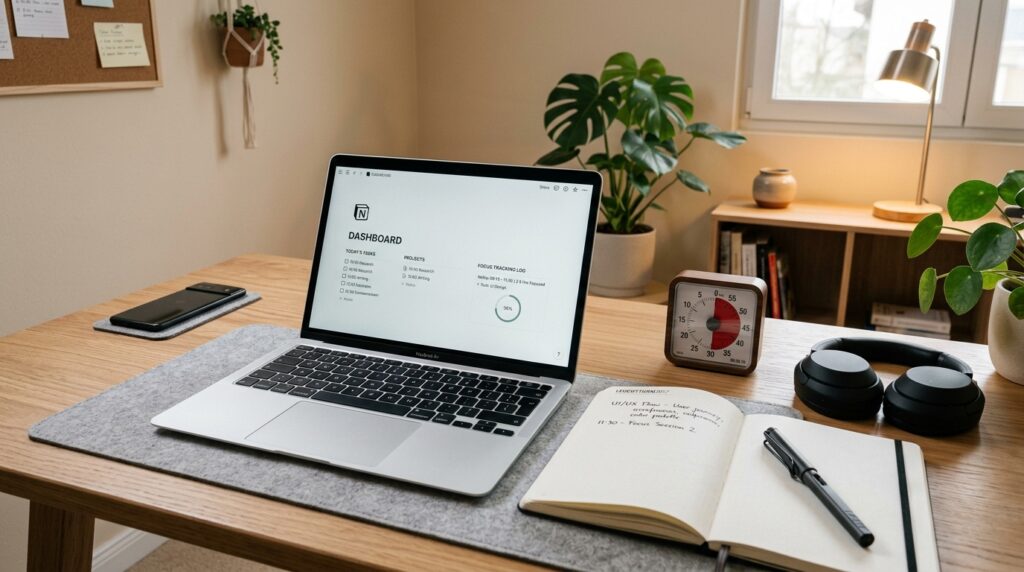
If you already use Notion, create a tiny database called “15-Min Focus Log.”
Each entry can include:
- Date
- Start time
- Task title (what you planned)
- Result (one-line summary)
- Next step
You do not need complicated formulas.
The goal is simply to see how often you are showing up.
If you’d like a more detailed walkthrough, our post 15-Minute Reading and Notion Routine: How to Turn Scattered Book Notes into a Simple Reading System shows how to build a light-weight reading tracker and can be adapted for focus blocks too.
Notes App or Paper Planner
Prefer paper? Use a small notebook reserved only for 15-minute blocks.
Digital-first? Use a simple notes app (Apple Notes, Google Keep, Obsidian) with one running note per day.
Minimum viable structure:
- Heading with today’s date
- Bullet list of each 15-minute block (goal, result, next)
Do not spend all your time designing the “perfect template.”
The habit of logging is more important than the format.
Everyday Tips for Making This Routine Stick
Anchor it to a specific time
Pick one daily slot where this 15-minute offline block always lives:
- Right after you get home from work
- Before you open email in the morning
- During your lunch break
- 30 minutes before bed
Consistent timing helps your brain learn, “When this happens, I focus now,” which is a key part of self-regulated learning.
Set a “minimum routine” for hard days
On good days, you might do two or three 15-minute blocks.
On heavy days, your minimum might be just one.
Decide in advance: “Even on the worst days, I will do one 15-minute offline block.”
A tiny minimum keeps the habit alive and prevents all-or-nothing thinking.
Treat notifications as the default enemy of focus
You do not have to delete every app, but during your block, treat notifications as if they are actively stealing from the task you care about.
Studies have found that even brief smartphone notifications can disrupt cognitive control and slow down performance on attention tasks.
When you see the block as a “notification-free zone” rather than a punishment, it becomes an act of respect for your future self, not a tech detox challenge.
Related Routines You Might Like
- 15-Minute Study Routine: How to Make Short, Focused Blocks Actually Work
A deeper dive into building short study blocks and chaining multiple sessions together without burning out. - 15-Minute Focus Timer Routine: How to Stop Checking Your Phone While You Study
Practical ways to set up timers, lock screens, and focus modes so your phone becomes a guardrail instead of a distraction. - 15-Minute Reading and Notion Routine: How to Turn Scattered Book Notes into a Simple Reading System
Step-by-step guide to creating a lightweight Notion setup to store reading notes and connect them to your 15-minute focus blocks.
Frequently Asked Questions
Q1. What if I only have 5 minutes, not 15?
A: Start with 5. Seriously.
If 15 minutes feels impossible, set a timer for 5 minutes and do the smallest possible version of your task—read one paragraph, solve one problem, or write two sentences.
Once 5 minutes feels easy, you can slowly extend to 10 or 15.
Q2 Can I use this routine for work tasks, not just studying?
A: Absolutely.
This 15-minute offline block works for any deep-focus task: writing reports, reviewing documents, planning your week, or brainstorming ideas.
The only rule is to pick one task and keep it offline for the whole block.
Q3 Which tools do I need to start?
A: You only need three things: a timer, something to write on, and something to work on.
A notebook + a basic phone timer (in airplane mode) is enough.
Apps like Notion, Todoist, or Obsidian are optional upgrades for tracking your blocks and linking them to bigger projects.
Q4 How many 15-minute blocks should I do per day?
A: For most people, 1–3 blocks per day is a good range.
You might start with one block after work and later add a morning or weekend slot.
Focus on building a consistent pattern before you worry about maximizing total hours.
Learn More
For more on focus, study habits, and digital distraction, see:
- European Journal of Educational Research – Cell Phone Notifications Harm Attention
Experimental study showing that smartphone notifications, even without active phone use, slow down performance on attention tasks.
https://www.eu-jer.com/cell-phone-notifications-harm-attention-an-exploration-of-the-factors-that-contribute-to-distraction - Computers in Human Behavior – The Effects of Smartphone Notifications on Cognitive Control
Research article discussing how frequent notifications are linked to lower cognitive control and more task-switching.
https://pmc.ncbi.nlm.nih.gov/articles/PMC9671478/ - Cornell Health – Study Breaks & Stress-Busters
Practical advice on using short, intentional breaks to boost focus and why social media is a poor break choice.
https://health.cornell.edu/about/news/study-breaks-stress-busters - Self-Regulated Learning Strategies and Academic Achievement
Overview of how planning, monitoring, and consistent routines support better academic outcomes.
https://pmc.ncbi.nlm.nih.gov/articles/PMC10132645/