
When Your New Study Tools Just Sit on Your Desk
You buy a shiny new study timer, a clean planner, maybe even a nice pen set.
For a few days, you use everything with full motivation… and then the tools slowly slide to the corner of your desk.
On busy days, it’s so much easier to just grab your phone, watch a few videos, and tell yourself you’ll “start properly tomorrow.”
The tools are there, but they’re not really part of how you study or work yet.
Research on self-regulated learning and habit formation suggests that studying at a consistent time with a repeatable structure matters more than adding extra hours or buying more tools.
Productivity research also keeps repeating the same message: build a simple routine first, then choose tools that support that routine—not the other way around.
This article will show you how to put your timer, planner, and apps inside a simple 15-minute study routine, so your tools stop being decorations and start being part of your daily system.
I started using this 15-minute “tools routine” on days when my brain felt scattered, and it was just enough structure to finally make use of my planner and timer without feeling overwhelmed.
Overview: A 15-Minute Routine That Uses Your Tools on Purpose
This routine is not about using every feature of your apps or filling every box in your planner.
It’s about giving your tools one clear job inside a 15-minute block.
Total: 15 minutes
- 3 minutes – Setup: Clear a small space, open your planner or app, set your timer
- 10 minutes – Focus: Work on one study or work task only
- 2 minutes – Review: Write down what you did and one line for “next time”
You can do this with:
- A paper planner or study notebook
- Digital tools like Notion, Todoist, TickTick, Apple Notes, or Google Tasks
- A physical study timer or just your phone timer
If you want help designing your 15-minute blocks overall, you might also like
15-Minute Study Routine: How to Make Short, Focused Blocks Actually Work.
Step 1 – Setup (3 Minutes): Space, Planner, Timer
The goal of this step is not a perfect desk or aesthetic Notion dashboard.
It’s simply to make one small, clear space for today’s 15 minutes.
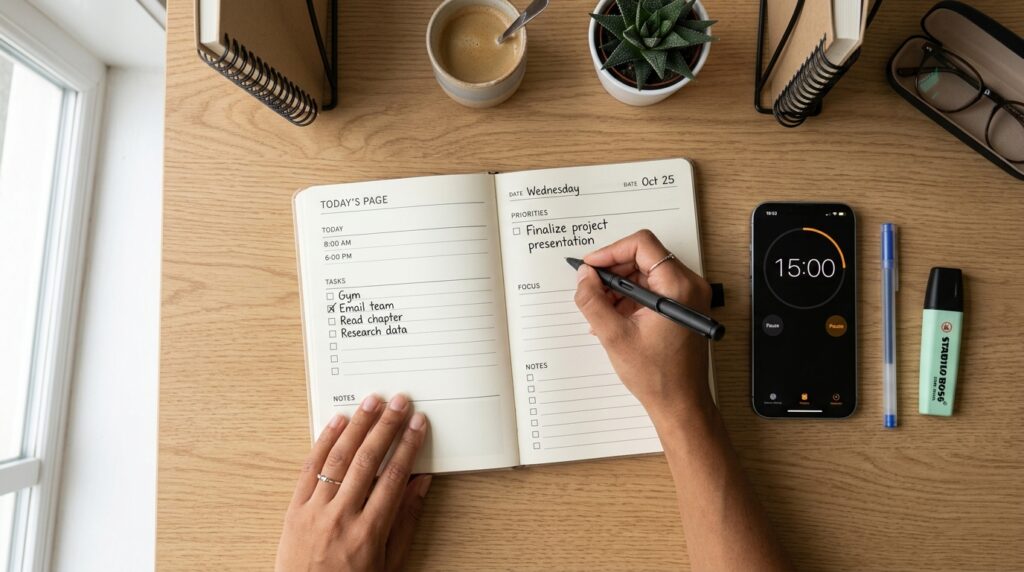
1.1 Clear a 30 cm Study Zone
Look at your desk for a moment.
- Move unrelated things—delivery boxes, receipts, snack wrappers—to one side or into a drawer.
- You don’t need a full clean-up. Just clear about 30 cm of space for your planner or laptop.
This tiny reset tells your brain, “This spot is for focused work, not just random scrolling.”
1.2 Open Your Planner or Study App
Now choose where today’s plan will live:
- Paper – Open your planner to today’s date, or grab an A4 sheet.
- At the top, write “Today’s Study” or “Today’s Focus”.
- Digital – Open one simple “Today” page:
- In Notion, a basic “Today” page or filtered view.
- In Todoist/TickTick, the Today view.
- In a notes app, a note titled “Today – Study Focus”.
If you’re using a brand-new study planner, resist the urge to decorate it first.
Create just two small sections:
- “Today’s One Focus Task”
- “One Line for Tomorrow”
If you need a more complete system later, you can always connect this routine to the structure in
15-Minute Planner Reset: How to Set Today’s Study Priorities Without Feeling Overwhelmed.
1.3 Set a 15-Minute Timer
Choose one timer for this block:
- Phone timer
- Study timer app
- Physical study timer
- Smartwatch
Set it to 15 minutes and, if possible, reduce distractions:
- Put your phone screen face down.
- Turn on Do Not Disturb for the next 15 minutes.
Let your timer have one job only:
keep time so your brain does not have to think about when to stop.
Step 2 – Focus Work (10 Minutes): One Task, One Job Per Tool
Now we use your tools inside a 10-minute focus block.
2.1 Choose One Task and Write It Down
In your planner or app, write one single line:
Examples:
- Review 2 units from my vocabulary book
- Solve 10 practice questions for the exam
- Read 3 pages and underline key ideas
- Draft one paragraph of my report
The key is to pick one, not list everything you should do.
When you press start on your 15-minute timer, your tools now have clear roles:
- Timer: runs the 15 minutes
- Planner: holds today’s one-line task
- Notes app or notebook: captures what you learn or think
Keeping each tool to a single job reduces decision fatigue and mental clutter.
2.2 Start the Timer and Reduce Distractions
Press start on your 15-minute timer.
Then quickly:
- Move your phone out of reach or keep only the timer visible.
- Close browser tabs that are not needed for this one task.
- If you use your computer to study, keep only the relevant window open.
During these 10 minutes, pay attention to one thing only:
- Studying the words
- Solving the problems
- Reading the article
- Writing the paragraph
Attention research often finds that our ability to sustain high-quality focus tends to drop after about 15–25 minutes without a break.
That’s one reason a 10-minute focus inside a 15-minute routine feels easier to start and easier to finish than a long, vague “study session.”
If you want help with the focus part itself (not just tools), you can pair this with
Can’t Focus? Try This 15-Minute Study Reset Routine.
Step 3 – Review (2 Minutes): Today’s Line and Tomorrow’s Line
When the timer rings, don’t rush to another tab or app yet.
Give yourself 2 minutes to close the loop.
3.1 Write One Line About What You Did
In your planner or app, write a very short summary of what you completed:
Examples:
- “Reviewed vocab units 1–2”
- “Solved 10 questions, 3 marked for review”
- “Watched 1 lecture, underlined key points”
Add a simple checkmark next to it:
- [✓] Reviewed units 1–2
This is where your new study planner or digital tracker starts to feel satisfying instead of empty.

3.2 Write One Line for “Next Time”
Now add one line for your future self:
- “Next: review unit 3”
- “Next: solve questions 11–20”
- “Next: write the next paragraph”
That one line makes it much easier to start your next 15-minute block because you’re not starting from zero.
Daily routines that include tiny planning steps like this tend to support self-directed learning and better long-term performance.
Your tools (planner, app, timer) are now doing what they’re meant to do:
- Helping you decide
- Helping you act
- Helping you remember
Tools That Make This Easier (Optional, Not Required)
You can run this routine with nothing but a notebook and your phone timer.
But if you want to make it more convenient, here’s how to choose simple tools without overcomplicating things.
4.1 Planner or Digital Page: One Box per Day
Choose a planner or layout that gives you:
- Space for today’s one-line focus
- Space for one line for tomorrow
- A simple checkbox or tiny area to mark completion
Paper options:
- A daily study planner with a clean layout and minimal decoration
- A simple notebook where each page is one day
Digital options:
- A Notion database with properties like “Date”, “Today’s Focus”, “Next Step”, “Done”.
- A Todoist/TickTick “Today” view where you pin one “Focus task” at the top.
For a more structured digital system, you can connect this to the workflows in
15-Minute Reading and Notion Routine: How to Turn Scattered Book Notes into a Simple Reading System.
4.2 Timer: Fast, Visible, and Simple
When choosing a timer (app or physical):
- Make sure you can set 15 minutes quickly—ideally with one or two taps/turns.
- Look for a clear visual countdown (for example, a colored ring or bar).
- Avoid timers that bombard you with extra stats every session; those details can be useful later, but they’re not necessary to start.
Examples of setups:
- Phone: A simple focus timer app with preset 15- and 25-minute options.
- Physical timer: A dial timer you twist to 15 minutes.
- Smartwatch: A “15-minute focus” shortcut you can trigger in one tap.
The main question to ask is:
“Can I start a 15-minute block in less than 5 seconds, even when I’m tired?”
If the answer is no, simplify your timer setup.
Everyday Tips: Where This 15-Minute Tools Routine Fits
This routine works best when it’s tied to a specific time or trigger, not just “whenever I feel like it.”
1. Attach It to One Time Slot
Pick one time that fits your current life:
- After you get home from work
- Right after dinner
- First 15 minutes of your lunch break
- Right after your morning coffee
For example:
- “Weeknights at 9 pm = 15-minute planner + timer block.”
- “Weekdays at 7:15 am = vocabulary 15-minute block.”
Habit research suggests that attaching a small, repeatable routine to the same time or cue each day makes it easier to maintain over the long term.
2. Use a “Minimum Version” on Hard Days
On days when you feel exhausted or unmotivated, change the rule:
- “Today, I only have to do one 15-minute set. Anything more is a bonus.”
Instead of aiming for 2–3 heavy study hours, you protect the habit of showing up.
This reduces the classic “all-or-nothing” crash that leads to long breaks and guilt.
If you want help designing your week around these small blocks, you can combine this with
Weekend 15-Minute Study Routine: How to Plan Your Week with Simple Time-Block Study Sessions.
3. Let Each Tool Do One Thing Only
To stop your tools from becoming overwhelming:
- Let your timer: only track time.
- Let your planner or app: only hold today’s one-line focus and “next time” line.
- Let your notes: only capture content and ideas, not tasks.
When every tool has one clear role, your brain has far fewer micro-decisions to make during your 15-minute block.
Related Routines You Might Like
- If you’re not sure how to structure your 15-minute focus blocks, see 15-Minute Study Routine: How to Make Short, Focused Blocks Actually Work.
- To design your whole day around short focus sessions, you can also check out 15-Minute Time Blocking: How to Turn a Scattered Day into Focused Study Blocks.
- If you want your planner to be more than a to-do list, pair this routine with 15-Minute Planner Reset: How to Set Today’s Study Priorities Without Feeling Overwhelmed.
Frequently Asked Questions
Q1. What if I only have 5 minutes, not 15?
A: Start with 5 minutes.
Write one line for today’s focus, start your timer for 5 minutes, and do the smallest possible version of that task.
The goal is to protect the habit of starting, not to hit 15 minutes perfectly every day.
Q2. Can I use this routine for work tasks, not just studying?
A: Definitely.
You can use the same 3–10–2 structure for tasks like writing reports, answering email in a focused batch, reviewing documents, or planning projects.
Just choose one clear work task as your focus for the 10 minutes.
Q3. Which tools do I actually need to start?
A: To begin, you only need one place to write (paper or digital) and one timer.
You can add a dedicated study planner, Notion dashboard, or a physical timer later, but don’t wait for the “perfect setup” to start.
Start with the simplest tools you can use today in less than 5 seconds.
Q4. How many 15-minute sets should I do in a day?
A: For most people, 1–4 sets per day is realistic.
You might do one block on busy days and chain several blocks together on weekends or deep work days.
Focus on building consistency first; volume can follow later as your routine becomes more natural.
Learn More
For more on study habits, focus, and time-blocking:
- LINCS (U.S. Department of Education) – TEAL Center Fact Sheet No. 3: Self-Regulated Learning
Self-regulated learning strategies help learners set goals, monitor their progress, and take responsibility for their own study, which supports better long-term performance.
https://lincs.ed.gov/federal-initiatives/teal/guide/selfregulated - UNC Learning Center – Studying 101: Study Smarter, Not Harder
Practical guide on managing study time, setting goals, and reducing distractions to improve focus.
https://learningcenter.unc.edu/tips-and-tools/studying-101-study-smarter-not-harder/ - The Learning Scientists – Spaced Practice
Explains why shorter, repeated study sessions work better than cramming, with simple implementation tips.
https://www.learningscientists.org/blog/2016/7/21-1