
Why a 15-Minute Monday Review Changes Your Whole Week
Monday morning (or after work) you finally sit down at your desk, open your laptop, and then freeze.
Your planner is half empty, your task list is messy, and your brain quietly whispers, What should I even start with?
So you check your phone, answer a few messages, scroll “for just a minute,” and suddenly an hour is gone.
If this sounds familiar, you are exactly who this routine is for.
Study habit research and education articles consistently show that regular, self-planned study time at similar hours each day is more strongly linked to better grades and self-directed learning than occasional marathon sessions.
In other words, how often you show up matters more than how long you grind in one sitting.
This 15-minute Monday review is a tiny ritual to reset your month, your week, and your today without rebuilding your whole system from scratch.
I started using this on Mondays when my Notion dashboard felt chaotic, and 15 minutes was just enough structure to see my priorities and commit to one small, doable action.
Overview: 15 Minutes to Reset Your Month, Week, and Today

This routine is simple on purpose.
You will spend:
- 3 minutes – Prepare your space and open your planner or Notion
- 10 minutes – Review and adjust: month → week → today
- 2 minutes – Write down your top 3 priorities and one minimum action for today
Instead of forcing yourself to “study for 2 hours,” you treat this as a weekly reset block that makes the rest of your study or work sessions easier.
Short, focused planning blocks also match what attention research suggests: we tend to concentrate best in 10–20 minute bursts before our focus starts to fade.
You can do this on paper, in a digital planner, or a mix of both.
In this guide, I will use Notion and a simple timer as the main tools, but you can adapt everything to your current apps.
Step 1 – Prep Your Space and Tools (3 Minutes)
A cluttered physical or digital desk makes planning feel heavier than it needs to.
Take 60 seconds to clear your workspace.
Move aside items that are unrelated to your current study or work—yesterday’s snacks, random papers, five different pens.
Then, open the tools you will use for this routine:
- Your monthly and weekly planner (paper or Notion)
- Your daily task list or inbox (Notion database, to-do app, or notes app)
- A simple timer app (phone, watch, or browser)
If you are using Notion, open your monthly and weekly views side by side or in tabs.
You can use a simple layout similar to the one in our 15-Minute Reading and Notion Routine: How to Turn Scattered Book Notes into a Simple Reading System.
Finally, set a 15-minute timer.
You are only committing to this block, not to your entire study session.
Tell yourself: For the next 15 minutes, I am just reviewing my month, week, and today—nothing more.
Step 2 – Scan Your Monthly Goals (3 Minutes)
Start zoomed out.
Look at your monthly goals or projects before you worry about today.
In your planner or Notion monthly board, find 2–3 key goals you wanted to make progress on this month.
Examples:
- Take 2 full mock exams
- Get halfway through my vocabulary book
- Start the first pass of my certification problem set
Next to each goal, quickly mark where you are:
- ✓ if you have already made some progress
- ○ if you have not touched it at all yet
You are not judging yourself here.
You are simply taking a clear snapshot: What did I say mattered this month, and where am I now?
If you are using Notion, you can add a simple “Status” property (Not started / In progress / Done) to each monthly goal.
For a deeper walkthrough on structuring monthly and weekly blocks, see 96 Blocks a Day: How to Use Color-Coded Time Blocking to Balance Study, Work, and Rest.
Step 3 – Adjust Your Weekly Plan (4–5 Minutes)
Now bring the focus one level down—from the month to this week.
3.1 Choose 2–3 focus items for this week
From your monthly goals, pick 2–3 items you still want to move forward this week.
Keep it brutally realistic.
Then break each one into a tiny, concrete piece for this week, for example:
- “2 mock exams” → This week: “Finish 1 full mock exam”
- “Half of the vocab book” → This week: “Memorize units 1–2”
- “Certification problem set” → This week: “Solve 10 problems from Chapter 1”
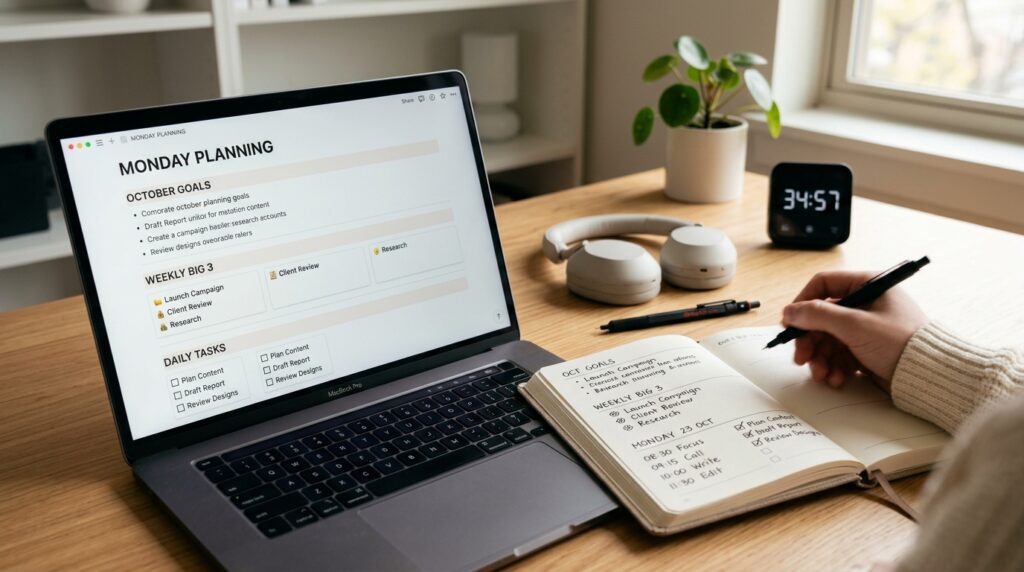
Write these in your weekly planner or Notion weekly board under a “This Week – Big 3” section.
The goal is not to fill every day with tasks.
The goal is to clearly mark the three things that truly matter this week.
3.2 Lightly time-block your week
Next, roughly decide which days you will touch each of these pieces.
It can be as simple as noting:
- Mon: Vocab unit 1
- Wed: Vocab unit 2
- Thu: 5 certification problems
- Sat: Full mock exam
You do not need a perfect timetable.
Think of it as placing three anchor points in your week, rather than scheduling every minute.
If you like digital time blocking, you can drag these into your calendar as 15–30 minute blocks.
For more ideas, see 15-Minute Time Blocking: How to Turn a Scattered Day into Focused Study Blocks.
Step 4 – Decide Today’s Minimum Actions (2–3 Minutes)
Now that your week has a shape, zoom all the way in to today—this Monday.
Look at your “This Week – Big 3” and choose 1–2 tiny actions you can complete in 10–15 minutes.
Examples:
- Memorize 10 vocabulary words
- Solve 2 certification questions
- Read 3 pages of your textbook
Write these down under a small “Today – Minimum Actions” section in your planner or daily page in Notion.
Think of them as micro-commitments.
It is okay if you later do more.
But the rule is: if you complete today’s minimum actions, today counts as a win.
Several education and self-directed learning programs emphasize that consistent, self-chosen study blocks—even short ones—support better academic performance and stronger self-directed learning skills over time.
Your Monday 15-minute review is the weekly switch that keeps that consistency alive.
Step 5 – Capture Your Weekly Big 3 and Today’s One-Liner (2 Minutes)
The last step is to write everything in one place so you can see it at a glance.
In your planner or Notion:
- List your 3 key goals for this week (Weekly Big 3)
- Under that, write one simple “Today Plan” line
For example:
This Week – Big 3
- 1 mock exam
- Vocab units 1–2
- 10 certification problems
Today – Minimum Actions
- Tonight: 10 vocab words + 2 problems
Sometimes this one small block of text is enough to save you 20 minutes of staring at your desk later, wondering Where do I start?
You just look at your weekly Big 3 and today’s line, set a 15-minute focus timer, and go.
If you need a structure for your actual 15-minute focus blocks, you can pair this planning routine with our post 15-Minute Study Routine: How to Make Short, Focused Blocks Actually Work.
Tools That Make This Routine Easier
You can run this entire routine with just a notebook and a timer, but digital tools can make it smoother to repeat.
Notion – Monthly and Weekly Boards
Create:
- A simple “Monthly Goals” database with properties like Goal, Status, and Notes
- A “Weekly Planner” page with sections for Weekly Big 3 and daily minimum actions
Link your monthly goals to weekly tasks so you can see which tasks support which goal.
Keep the layout clean—two or three sections are enough to start.
A Simple Focus Timer
Use your phone’s clock app, a minimalist timer website, or a dedicated focus timer to run the 15-minute block.
Avoid overly gamified apps at this stage; the goal is clarity, not perfection.
If you struggle with checking your phone during these 15 minutes, pair this routine with the strategies in 15-Minute Focus Timer Routine: How to Stop Checking Your Phone While You Study.
Everyday Tips to Keep Monday Light
- Pick a fixed Monday time: before work, after work, or before your main study session.
- Make the rule: If I only do the Monday 15-minute review, the day still counts as a success.
- On high-energy days, stack 1–2 focus blocks after the review.
- On low-energy days, allow yourself to stop after the review and one minimum action.
The point of this routine is not to create a perfect planner.
It is to reduce the friction of starting your week and to keep your study and work plans grounded in reality, not fantasy.
Related Routines You Might Like
- 15-Minute Study Routine: How to Make Short, Focused Blocks Actually Work – A deeper dive into building short study blocks and chaining multiple sessions together.
- 15-Minute Time Blocking: How to Turn a Scattered Day into Focused Study Blocks – How to plan your day around short focus sessions without feeling overwhelmed.
- 96 Blocks a Day: How to Use Color-Coded Time Blocking to Balance Study, Work, and Rest – A full-day framework for organizing work, study, and rest into small, visual units.
Frequently Asked Questions
Q1. What if I only have 5 minutes, not 15?
Start with 5.
Open your planner or Notion, pick one weekly priority, and write down a single “Today – Minimum Action.”
The goal of this routine is to remove friction, not add more pressure.
Once 5 minutes feels normal, you can extend it to 10 or 15 minutes.
Q2. Can I use this routine for work tasks, not just studying?
Absolutely.
You can treat “monthly goals” as projects, “weekly Big 3” as key deliverables, and “today’s minimum actions” as tiny steps toward those deliverables.
This works especially well for knowledge workers juggling emails, meetings, and deep work.
A short Monday reset can prevent your week from being entirely reactive.
Q3. Which tools do I need to start?
You only need three things:
- A place to see your month and week (paper planner or Notion)
- A daily page or list for today’s minimum actions
- A basic 15-minute timer
If you enjoy digital setups, Notion plus your phone’s timer is enough.
You can always add more tools later, but do not wait for the perfect setup to start.
Q4. What if my plans keep changing during the week?
That is normal.
This routine is not about predicting your entire week perfectly.
Use your Monday review to set direction and your minimum actions.
If things shift, you can adjust these during the week or add a 5-minute micro-review on Wednesday or Thursday to realign.
Learn More
For more on focus, study habits, and structured time blocking, see:
- Jotverse – Time Blocking for Students: The Ultimate Productivity System for Academic Success
Practical guide to using time blocking to manage study sessions, reduce decision fatigue, and maintain consistent progress.
https://www.jotverse.com/time-blocking-for-students-the-ultimate-productivity-system-for-academic-success/ - Summit Learning Charter – 7 Benefits of Time Blocking Methods for Studying
Explains how time blocking can improve concentration, organization, and academic performance for students.
https://summitlearningcharter.org/resources/blog/benefits-of-time-blocking/
Leave a Reply